

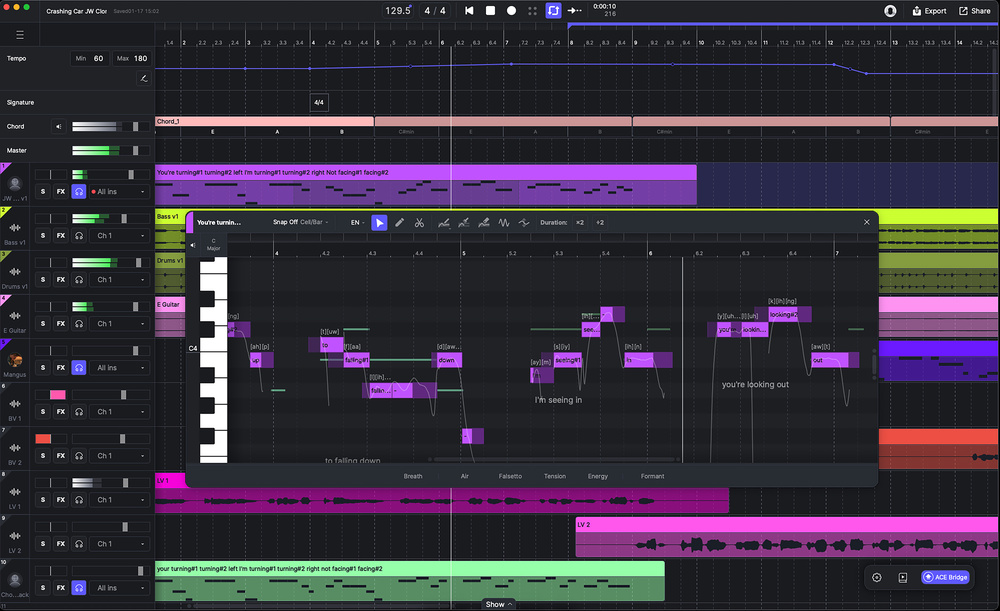
 ACE Studio 2.0’s highlight remains its vocal synthesis capabilities, but the Canvas now provides a more DAW‑like user experience.
ACE Studio 2 begins an ambitious expansion beyond its vocal synthesis roots.
When SOS first looked at ACE Studio in the November 2024 issue, the product was already attempting something fairly ambitious: a virtual instrument offering AI‑based vocal synthesis and capable of producing natural human vocals from MIDI note and lyric data. And, in the main, it did a remarkable job, letting you create virtual vocals for your projects that were undoubtedly good enough for a number of obvious use cases.
With ACE Studio 2.0 vocal synthesis is still very much the headline feature. However, v2 sees ACE Studio evolving into an all‑in‑one AI music studio environment that adds a more DAW‑like workflow, a novel approach to instrument synthesis, voice cloning, and various generative AI music options.
Ethically Trained
Before we dig into what this expanded concept offers, let’s briefly address one of the elephants in the room. ACE Studio’s various AI features obviously require a data source for their training. Parent company Timedomain make it very clear that this has been approached in an ethical fashion, collaborating with the musicians/performers involved and providing suitable compensation. Whatever your personal position on the desirability of vocal synthesis or generative music, a critique based upon copyright or IP concerns over the training content has been suitably bypassed here.
Vocal Chops
Vocal synthesis is still ACE Studio 2.0’s primary function and this operates in a broadly similar fashion to the original. With the Canvas’ DAW‑like track versus timeline environment, you can create a suitable MIDI part on a track, add lyrics to the MIDI notes, pick a voicebank, and ACE Studio then renders a sung performance of that note/lyric content using the chosen voice.
MIDI clips can be created by manual editing, recording, MIDI file importing or, alternatively, you can import/record your own ‘scratch’ vocal as audio and apply the remarkable Vocal To MIDI function. This extracts pitch and lyrical content from your audio performance and produces a suitable MIDI clip for the synthesis engine. Yes, some subsequent editing may be required, but it you are starting from a clean recording without harmonies or effects such as reverb or delay, this is a very efficient process even if you don’t really consider yourself to be a singer. As before, the vocal synthesis can be rendered within the cloud, but computers with suitable CPU/GPU hardware can now also use a local ‘Turbo’ mode that can shave some time off the process.
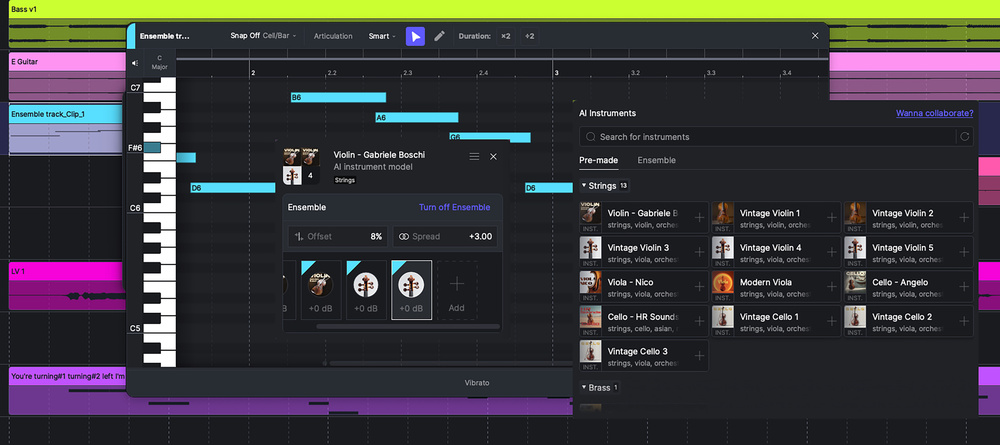 ACE Studio 2.0 includes an very interesting take on the synthesis of virtual instrument sounds.
The synthesis engine attempts to add some natural performance elements to the rendered vocals derived from the specific voice model you have chosen. As v2.0 considerably expands upon the catalogue of available voicebanks, now spanning many music genres, genders, ages and native languages, you have plenty of ways to experiment to find the best vocal character to suit your specific musical project. A new synthesis engine — Verse25 — provides you with four parameters — Power, Soft, Breathy and Chest, plus the option to add breath noise — that can be automated to vary the vocal delivery further. For pre‑2.0 voicebanks, you can also access earlier versions of the synthesis engine should you wish.
There are two key new functions within the vocal synthesis feature set; Choir Mode and Blend Voices. Conceptually, the latter is simple; you just add additional voicebanks via the track’s header panel, balance their levels, and the synthesis engine will combine their timbral characteristic when rendering. Choir Mode lets you generate multiple voices from the same MIDI/lyric clip, with control over the tightness of their timing (Offset), stereo spread (Spread) and gain. You can, of course, use multiple different voicebanks for a genuine choir‑like result or multiples of the same voicebank to provide things like vocal doubling. The results can be impressive.
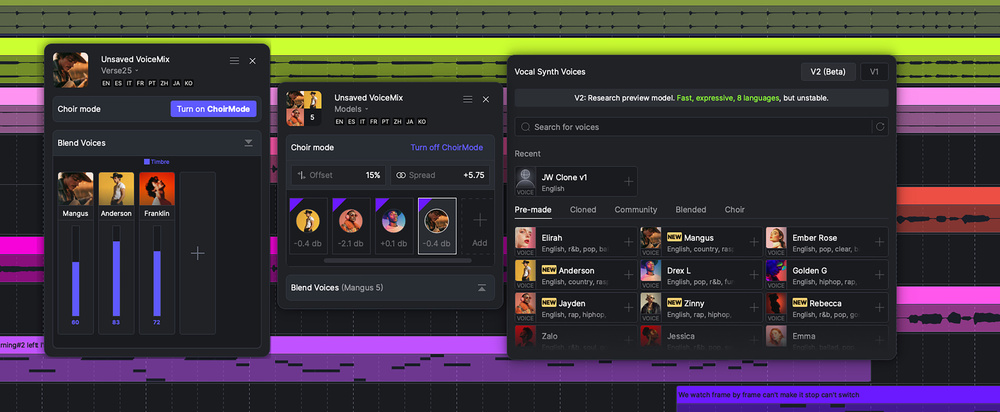 As well as a considerable number of new voicebanks, the engine now includes Blend Voices and Choir Modes.
In addition, you can now clone your own voice (or that of another singer you have recorded). As I experienced with the similar function when reviewing IKM’s ReSing recently, this is not a task to be undertaken lightly. I did experiment with ACE Studio’s version of this tech, albeit with a somewhat limited set of training data. The results were very promising — me, but not quite — but I suspect you would have to collate an extensive, and varied, collection of cleanly recorded singing examples for the cloning process to match that of the built‑in voicebanks.
DAW-like Environment
The revamped main workspace — the Canvas — provides a familiar DAW‑style environment within which you can add both audio and MIDI‑based tracks, and record or arrange clips for each along the timeline. The basic editing tools for these clips or their contents are not as fully featured as you would find in a mainstream DAW, but the MIDI editing environment is suitably tailored for the AI voice and instrument sounds that are ACE Studio’s highlight. For audio clips, this is where you can access the new Stem Splitter and this offers three different splitting options. The results are generally good, and it is certainly convenient to have the process ‘in house’.
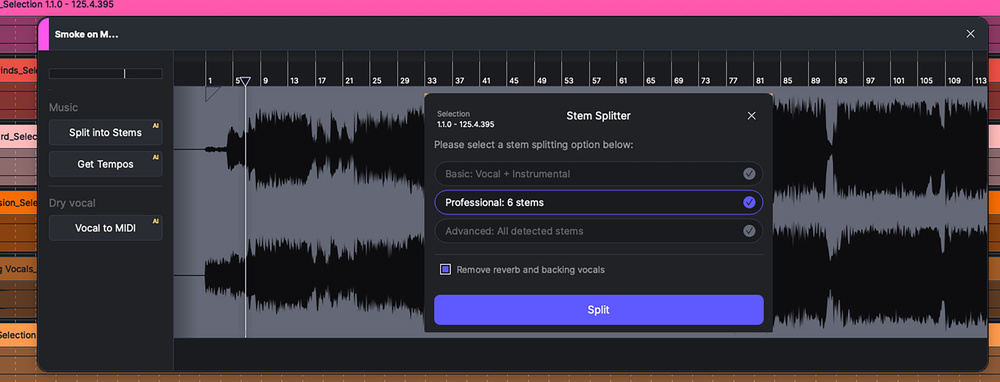 As well as Vocal To MIDI functions, audio clips now have direct access to a stem splitter.
Additional track types include the Chord Track and the Tempo & Signature Change Track. With the latter pair, existing MIDI data is adjusted to follow any changes made but, as yet, no similar time‑stretching is applied to any existing audio clips. The Chord Track lets you lay out a chord sequence along the timeline. On playback, this simply triggers a basic piano part and that’s perfectly suitable as a backing track while you work on a MIDI‑based vocal or instrument idea. However, it doesn’t interact with the other content — MIDI or audio — within the Canvas; changing a chord within the Chord Track will not re‑voice your vocals, instruments or existing audio to match.
The mixing environment is pretty basic compared to a more conventional DAW, but you can, of course, integrate ACE Studio with a DAW using either the ACE Bridge 2 plug‑in or via ARA in a DAW that supports it.
Vocal Synthesis For Instruments
For me, the most intriguing new feature v2.0 provides is the AI instrument synthesis. The initial selection of instruments is focused on non‑chordal options such as violin, cello, trumpet or saxophone. These use the same approach as the vocal synthesis engine, so ‘voicebanks’ have been built from performances of real performers, and the engine can then attempt to impart some of this human expression into the rendered performance. Equally, the engine can use a ‘smart’ approach to automatically assign articulation changes based upon the nature of the performance. Usefully, prior to the rendering process, you get basic sounds for each instrument that serve for real‑time use as you record the initial MIDI.
There is a really interesting concept at play here. By using information gleaned from real performers to inform how the virtual performance is then delivered, the potential of the approach is obvious. I’d be very surprised if we don’t see some of the mainstream sample‑based virtual instrument developers dipping their R&D toes into this pond very soon. Indeed, as we were going to press, ACE Studio announced a new collaboration with EastWest, so that process may well be underway.
Prompt Delivery
ACE Studio’s new AI generative music options come via three different avenues — Inspire Me, Add A Layer and Music Enhancer — each of which can generate musical ideas from suitable prompts. Inspire Me can deliver a whole song, from a prompt idea or from lyrics, and either with or without a vocal (although this vocal is AI generated, it doesn’t employ ACE Studio’s own vocal synthesis engine).
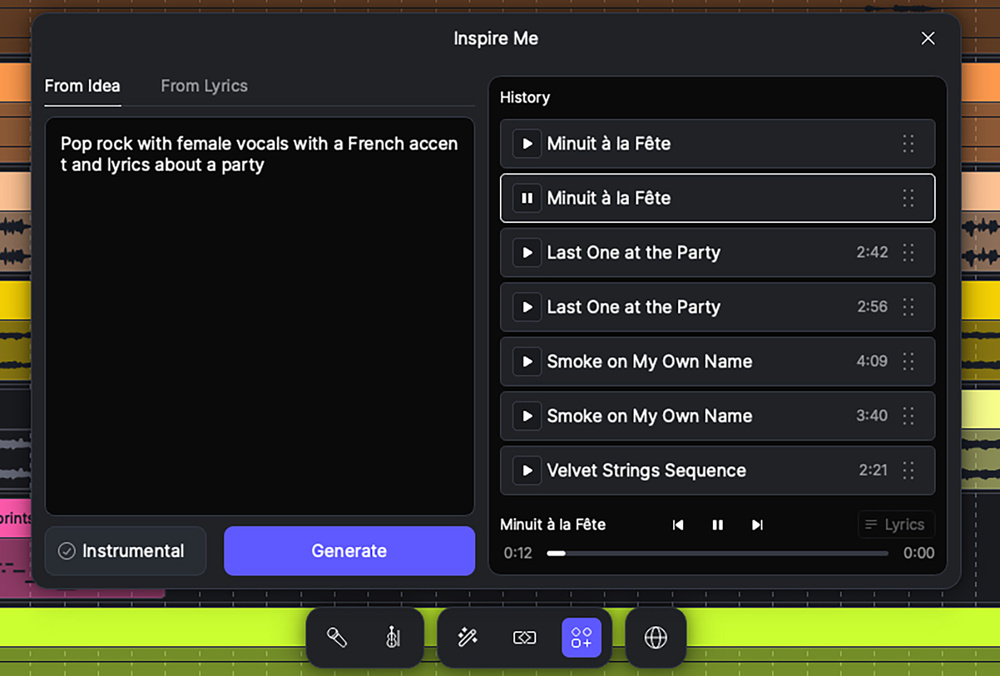 Generative music is now part of the ACE Studio feature set and Inspire Me lets you generate a complete song based upon a simple text prompt.
Add A Layer provides a similar function, but you can define a clip length in the Canvas if you just want a few bars as a starting point. I was working with v2.0.2 at the start of the review process and, at this point, the generated music didn’t really seem to reference any existing content within the project. However, v2.0.5 arrived just as I was finishing the review, and this produced a significant improvement in this feature. So, for example, if you wanted to add a new element — guitar, bass, vocal, drums, etc — to an existing idea already on the Canvas, this is now possible. I tried a few different musical styles — rock, house, EDM — and, while the results wouldn’t win prizes for musical originality, and produced the occasional musical oddity, they were generally on point.
The documentation suggests Music Enhancer will take a user‑defined selection of your current Canvas content, analyse it, and then ‘reimagine’ it using AI into a different music style. In use, I found it a bit hit and miss and often got an ‘analysis failed’ message. That said, both Music Enhancer and Add A Layer are currently shown as beta features so, presumably, there is still more to come...
A further element of the AI toolkit is the supplied Generative Kits. These are a downloadable catalogue of musical projects and project elements in a range of genres that you can use as starting points to inspire your own ideas. The song kits generally include an instrumental backing track (as audio, and which you could stem split) and a sung vocal. The latter uses one of ACE’s own voicebanks, so the voice can be swapped out, and the MIDI part is full editable. They do provide a very good demonstration of the voice synthesis engine’s capability and, for that reason alone, would be well worth exploring for new users.
Playing The ACE
So, what’s all this new — and ambitious — functionality like in use? Well, the vocal synthesis engine remains impressive and the wider selection of voicebank options are welcome. In the main, it is also remarkably easy to use, so getting to a first pass at a melodic/lyric idea — and then being able to develop it — is not particularly difficult. The results are good enough for a variety of real‑use cases such as creating vocal hooks, backing vocals and harmony vocals. You could also easily generate a full lead vocal demo to serve as a guide to a real singer. If you are aiming for synthesized vocals to actually fill the lead vocal role, perhaps that’s a case‑by‑case question, and whether the quality bar is jumped may well depend upon what the final use of the song is intended to be. The Voice Cloning feature is also off to a promising start.
I had plenty of success coaxing very usable performances out of the various string and brass instruments by recording myself scratch‑singing my best impression of the target instrument and applying the Vocal To MIDI function, before finally picking the appropriate AI Instrument to perform the resulting MIDI.
The introduction of ACE Studio’s own AI‑based virtual instruments is also a hit. I had plenty of success coaxing very usable performances out of the various string and brass instruments by recording myself scratch‑singing my best impression of the target instrument and applying the Vocal To MIDI function, before finally picking the appropriate AI Instrument to perform the resulting MIDI. This is a lot of fun and the potential is intriguing. Watch this space... things could get interesting.
The new Canvas environment does mean you can do more within ACE Studio than just vocal synthesis, but it is still some distance for a fully fledged DAW; for example, the absence of support for third‑party VST/AU plug‑ins. In terms of the AI‑based generative music features, the quality and variety of full mixes generated from text prompts was, like most AI generated music, fairly generic and the variety seemed somewhat genre‑dependent. Still, it’s scary to hear a ‘finished song’ appear so easily and, presumably, the results will only improve further as the AI engine’s training library continues to expand.
However, for me, the missing link is how the AI generative options integrate with ACE Studio’s vocal synthesis. For example, when you use the generative processes to create a musical idea, any vocals within the output are generated as audio. Maybe it’s an ambitious ask, but it would be brilliant if the generative stage included the option to create a MIDI‑based synthesized vocal instead of the audio one embedded within the mix. This could really link the two main strands of ACE Studio’s technology in a genuinely useful way.
50 Shades Of AI
The act of generating music via AI entirely from a prompt is undoubtedly something where opinions can be black, white... and multiple shades of grey in between. Thankfully, ethical sourcing of training materials deals with the most obvious legal concerns, but it still leaves plenty of scope for reservations on various artistic grounds. That’s a discussion for another day.
In v2.0, the vocal synthesis capabilities that are ACE Studio’s headline act have been expanded in some very useful ways and I’d still suggest this would be the key feature around which a purchase decision might be made. If vocal synthesis is your primary interest, then Dreamtonics’ Synth V would represent the obvious competition.
Timedomain clearly now see ACE Studio as a broader concept with the three new strands — the more DAW‑like Canvas, generative AI music and virtual instrument synthesis — added to the impressive virtual vocalist. The fruits of some of these ambitions may still be to come but, in the case of the approach underlying the instrument synthesis, I think this is a genuinely interesting technology. Is this expanded concept for you? Timedomain offer a seven‑day money‑back guarantee but, currently at least, there is no limited‑time free trial available.
Pros
- The vocal synthesis is genuinely useful for a number of real‑world applications.
- The new instrument synthesis technology has considerable potential.
- Voice cloning is off to an encouraging start.
Cons
- Integration between vocal synthesis and AI generative music features perhaps still a work in progress?
- The Canvas is not yet a fully‑fledged DAW replacement.
- No limited‑time free trial available.
Summary
ACE Studio 2.0 represents an ambitious expansion of the software’s remit well beyond its vocal synthesis roots, although some elements of that ambition are perhaps still to be fully realised.
Information
Artist $497, Artist Pro $660, annual rent‑to‑own subscription Artist $16.58/month or Artist Pro $22/month (both charged annually). Rent‑to‑own completes after two years. Prices include VAT.
Artist $497, Artist Pro $660, annual rent‑to‑own subscription Artist $16.58/month or Artist Pro $22/month (both charged annually). Rent‑to‑own completes after two years.