

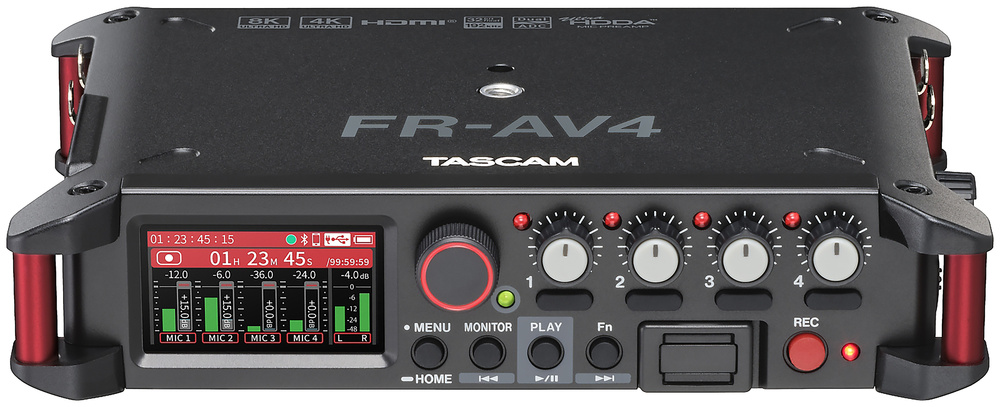
With a quartet of excellent preamps and 32‑bit floating‑point recording, Tascam’s FR‑AV4 could be a videographer’s dream...
Building on the success of the company’s two‑channel FR‑AV2 recorder (reviewed in SOS June 2025), Tascam have now released a larger, four‑input recorder based on the same impressive technology. Like its smaller sibling, the FR‑AV4 is strongly geared towards those working with digital cameras, allowing sound to be recorded independently on four high‑quality audio tracks for post‑production and remixing, with perfect synchronisation guaranteed thanks to the machine’s comprehensive timecode connectivity options. But, of course, it can also be used independently as a four‑track audio recorder.
Physical Form
The extremely compact FR‑AV4 measures 184 x 42 x 130mm (WHD) and, thanks to its robust fibreglass casing, weighs just 756g when four AA batteries are installed (it’s 660g without them). The machine can be configured to work with alkaline, Ni‑MH or lithium cells, from which it draws a maximum of 5.4W. With alkaline batteries, the worst‑case operating duration (with four phantom‑powered mics, and both the HDMI connection and headphones in use) is around 1.5 hours. That rises to four hours with lithium cells, while recording just two inputs without phantom power, and with no headphone or HDMI connections, increases the operating time to 9 hours for alkaline and 17 hours with lithium batteries.
Helpfully, the four AA batteries are accommodated in a plastic holder cartridge which inserts into the rear of the unit behind a screw‑down flap. Spare holders are available as accessories, to enable fast battery swaps if required, although I imagine most professional users would employ the internal cells as a redundant backup supply and power the unit primarily from its USB‑C connector from a dedicated external supply of some sort, to give much longer operating durations. An optional mains power adaptor is also available, and that connects via USB.
A Kensington slot (to accommodate a Kensington lock tethering cable) is available on the rear panel, and all four corners of the unit feature pillars for strapping to support the unit if placed in a protective carry‑bag. Both the top and bottom panels of the FR‑AV4 feature threaded quarter‑inch inserts to allow mounting on tripods, cameras or other standard grip equipment.
Like its smaller sibling, the FR‑AV4 can record to its memory card at sample rates of 48, 96, or 192 kHz and in either 24‑bit linear or 32‑bit floating‑point files using the WAV (BWF) format. There’s also an option to record in MP3 format at 48kHz, with bit rates of 128, 192, 256 or 320 kbps. All four input channels are recorded individually, along with a stereo mix, usually as separate mono or stereo files (depending on the channel‑linking status). However, there’s an option to record all six channels as a single polyWAV if that’s preferred.
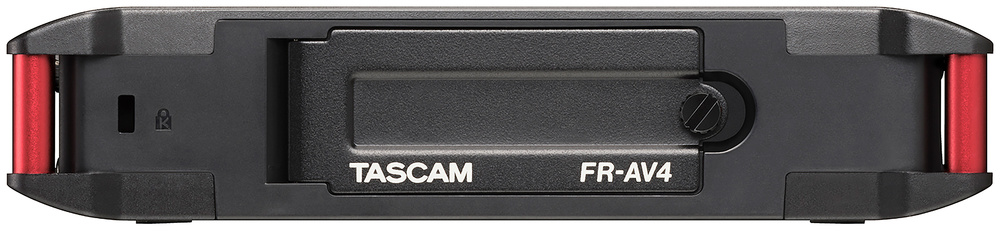 The single SD card slot is protected inside the screw‑shut battery compartment.
I was surprised, given the larger size of the new recorder, that Tascam have opted to provide only a single memory card slot. The microSD format may be convenient, but on a professional machine I’d have preferred dual slots (as on, for example, my own Zoom and Nagra recorders) for redundant backup purposes and, potentially, the ability to record to different formats simultaneously. But at least the FR‑AV4 shares the same automatic file closing system as its sibling, which prevents the loss of recorded audio in the event of power failure. The SD slot accepts a microSD, microSDHC or microSDXC card (a maximum capacity of 512GB is currently supported), and there’s a welcome improvement over the FR‑AV2 too: the card slot is now much better protected, behind the screw‑down battery cover at the rear of the unit.
Connectivity
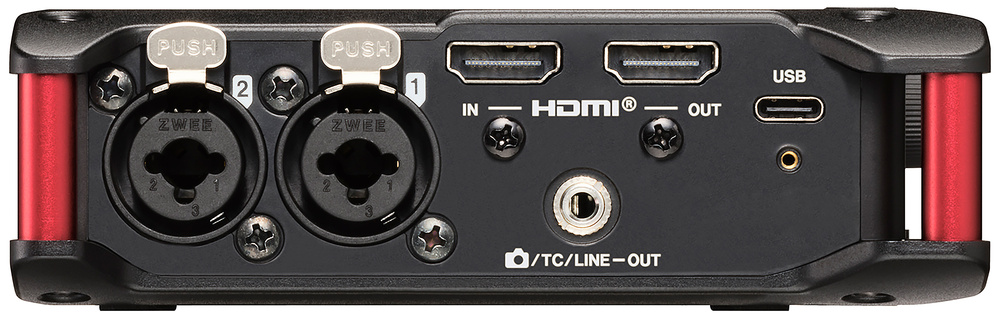 The FR‑AV4 has an HDMI input and output, which caters for sync as well as replacing the audio in the video feed that passes through it.
The left‑hand side panel features combi XLRs for inputs 1 and 2, plus a USB‑C connector and a 3.5mm output socket that can be configured to feed unbalanced stereo audio or linear timecode to a camera or timecode transmitter. Uniquely, in this market, there’s a pair of HDMI connectors to provide an HDMI input and output. The HDMI input is provided principally as a convenient means of receiving timecode and record/stop instructions from a connected camera, and the video content (2k, 4k and 8k formats are all supported) is passed straight through to the HDMI output for onward connection to a monitor screen or video recorder. Helpfully, the recorder’s internal audio sources (channels 1+2, 3+4, or the stereo mix) can be inserted into any of the four stereo audio channels of the HDMI output stream, replacing any original audio signals being conveyed by it. The potential benefits of that should be obvious, although I was surprised to discover that any existing audio embedded in the HDMI input stream cannot be extracted and recorded by the FR‑AV4.
The recorder’s internal audio sources... can be inserted into any of the four stereo audio channels of the HDMI output stream, replacing any original audio signals.
Tascam’s user manual explains how up to four FR‑AV4s can be daisy‑chained, using the HDMI connections to share timecode synchronisation and start/stop commands, and how the stereo mix from each machine can be embedded in the HDMI stream passing between them to allow monitoring at a final destination. I’m sure this feature will be useful in some situations, though I was disappointed that the same HDMI connection can’t be employed as single‑cable hookup to a second recorder for a safety backup. Perhaps a future firmware update will add the ability to record from the HDMI stream in the same way that it can record from its USB input?
On the subject of USB,...
You are reading one of the locked Subscribers-only articles from our latest 5 issues.
You've read 30% of this article for FREE, so to continue reading...
- ✅ Log in - if you have a Digital Subscription you bought from SoundOnSound.com
- ⬇️ Buy & Download this Single Article in PDF format £0.83 GBP$1.49 USD
For less than the price of a coffee, buy now and immediately download to your computer, tablet or mobile. - ⬇️ ⬇️ ⬇️ Buy & Download the FULL ISSUE PDF
Our 'full SOS magazine' for smartphone/tablet/computer. More info... - 📲 Buy a DIGITAL subscription (or 📖 📲 Print + Digital sub)
Instantly unlock ALL Premium web articles! We often release online-only content.
Visit our ShopStore.